Hosting an Archipelago multiworld
Follow the written steps below, or watch Appie set up Crash Team Racing and Poképelago in one multiworld.
Prefer YouTube? Open the video with chapters and subtitles.
What Archipelago Pie does and does not do
Archipelago Pie collects player YAMLs in a collection room, and gives you the reviewed APWorld catalog and a YAML Builder for making them. It does not generate the multiworld and does not run game servers: you generate locally with the Archipelago Launcher, then host the server on archipelago.gg or your own machine.
What a host actually does
Every multiworld has one person wearing the host hat. The host collects one configuration for each world, generates the game from that stack, puts the server online, and gives every player what they need to connect. Most players bring one world, so this often looks like one YAML per player.
Playing alone does not skip any of this. A seed with one world still has to be generated and then hosted, and the host in that case is you, on your own machine.
Before you start, install Archipelago itself from the official releases page. The installer bundles the launcher, the generator, and the server in one package.
Step 1: collect the YAMLs
Each player normally submits one YAML for each slot they bring, and Setting up your YAML explains that side. Players who do not want to edit the file by hand can use the guided YAML Builder. Give every slot a unique name, including when one person brings several games. You can collect the files however you like, but chasing attachments through chat gets old fast. Collecting YAMLs in an Archipelago Pie collection room covers creating a collection room, sharing one link, checking submissions, closing at the deadline, and downloading the complete stack.
A collection room only gathers YAMLs before generation. Game clients connect to the Archipelago server room created in step 3, not to the collection room.
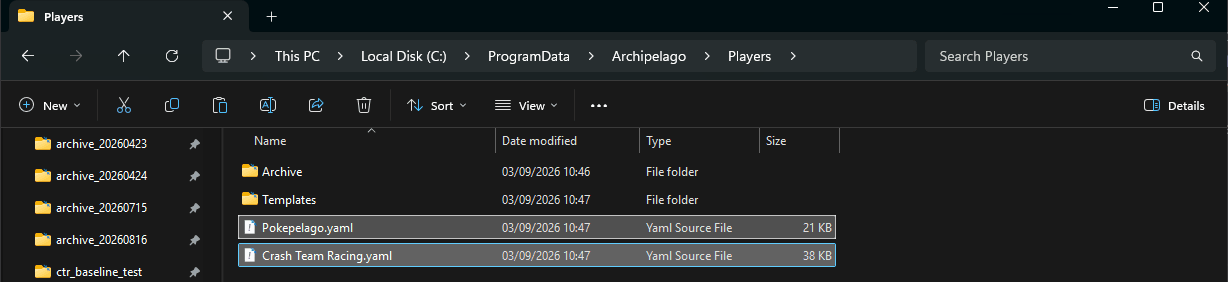
However you collect them, you end up with one YAML per slot. This stack is two slots from two players.
Step 2: generate the game
Put all the YAML files in the Players folder inside your Archipelago install. If you downloaded a ZIP of YAMLs from a collection room, extract the YAML files first. Keep only the slots intended for this seed in Players. On Windows the default install location is C:\ProgramData\Archipelago, so the folder is usually C:\ProgramData\Archipelago\Players. If you chose a different location or cannot find it, the launcher's Browse Files entry opens your install folder.
The same install folder holds custom_worlds. That is where APWorlds live for games Archipelago does not ship with, and the launcher's Install APWorld entry puts them there. A host generating Crash Team Racing or Poképelago needs that game's APWorld installed before generation will work.
Agree on the version of each game integration before players create their YAMLs. The generator's APWorld, the YAML options and the players' clients need to be compatible; follow that release's setup guide. The video uses CTR 0.2.0 alpha 7 and Poképelago 0.6.4 as its example, not as a requirement to use those versions for every future seed.

The Players folder sits in the Archipelago install folder, next to output and custom_worlds.
Then open the Archipelago Launcher and click Generate. The generator reads every YAML, weaves the worlds together, and writes a zip into C:\ProgramData\Archipelago\output. The file is named AP_ followed by a long number, so AP_99118272869059136761.zip and similar. That single zip is your whole multiworld.

Generate and Host are both in the Archipelago Launcher, alongside the clients and the other tools.

A successful run leaves exactly one new zip in the output folder. That is the file you upload or host.
If generation fails, read the error for the affected game, YAML or option. The online YAML checker can help with games available on that server, but it does not install your custom APWorlds. For community integrations such as CTR and Poképelago, test generation locally with the agreed APWorlds installed. A YAML passing an individual check does not guarantee that the full group will generate successfully.
Step 3: put the server online
The easy route is letting archipelago.gg host for you. It takes three steps.
First, open the Host Game page and select Upload File. Pick the AP_...zip from your output folder.

The Host Game page takes the zip straight from your output folder. Upload File is the only control you need.
Second, the upload gives you a seed page rather than a running server. It lists the seed, how many players are in it, and a spoiler download. Select Create New Room to start the server.

Uploading creates a seed. Create New Room turns that seed into a server your players can join.
Third, you land on the room page. It carries the address and port to connect to, one row per slot with any data file that slot needs to download, a tracker link per slot, and a console for host commands. Hosted rooms may sleep after inactivity and resume when somebody opens the room page, so players should use the current connection details shown there.
You can also host on your own machine. Click Host in the Archipelago Launcher. A Select multiworld data dialog opens in your output folder, and you pick the AP_...zip directly, with no need to extract anything first. A console window titled Running Archipelago then opens and the server is up.

A self-hosted server runs in a console window and prints the address and port it listens on.
The example console shows warnings about a missing manifest and an already-loaded game, followed by a successful server start. Other errors may need attention. Look for the Hosting game at line to confirm the server is listening. An address of 0.0.0.0 or :: is a bind address, not an address to send to players: use localhost on the same machine, the host's LAN address for another machine on your network, or a reachable public address for remote players.
The default port is 38281; use the actual port if you changed it. For a typical home-router setup, remote players need that TCP port forwarded to the host and allowed through its firewall. If your connection does not support inbound connections, use archipelago.gg or arrange another reachable host. For most groups the archipelago.gg route is less hassle. On Windows, extracting the .archipelago file from the zip and double-clicking it is another way to start the server.
Step 4: share and play
If you use archipelago.gg, share the room page link with your players. It lists the server address and port, every slot name, and any data file a slot has to download. Send the password separately if you set one, along with the agreed game integration versions and setup guides. If you host locally, send the reachable address, port, exact slot names and any generated player files directly; the local server does not create an archipelago.gg room page.
The slot name is the one detail players ask about most. It is the name field from that player's own YAML, copied exactly, and it is what the client asks for when connecting. It is not the game name and not their Discord name. The room page lists every slot name in the multiworld, so you can read them off there if a player is unsure.

The room page carries the connect line players need, the slot table with each slot name and any downloadable data file, and a console for host commands. The port is blanked out here because every room gets its own.
From there each game's client, mod, or connector takes over. Setting up an Archipelago game client explains the common patterns and a pre-play test. Exact installation steps belong in the game-specific guide.
While the game runs, the server console (or the room page on archipelago.gg) accepts commands. Players can ask for hints with their earned hint points, and as host you can release a leaver's remaining items or collect what belongs to a finished player. Type /help in the console to see what is available.
Where to go next
If your players are new to all of this, hand them Getting started with Archipelago and the per-game guides on the guides page. For keeping an eye on everyone's progress, the room page here shows a live tracker, and PopTracker covers personal tracking.